A knowledge panel is an information box in Google Search that gives a quick snapshot of a person, place, organization or other entity that Google knows from its Knowledge Graph. This entry covers the Google feature. A market research product named KnowledgePanel is unrelated. Google builds the box automatically.
Where does the content come from?
Google states that knowledge panels are generated automatically from information across the web. For some topics, such as movies or music, Google combines data from partners with open web sources. Information from verified entities that suggested edits can also appear. Images in the panel can come from a claimed panel with a chosen featured image, or they are a preview of Google Images results.
Panels update as the web changes. Google also considers corrections from the entity itself and general user feedback.
Can you claim or change a knowledge panel?
Google says it does not manually create or delete knowledge panels. Their appearance depends on automated systems and on how relevant the information is to a query. Someone who represents the entity can claim an existing panel through the “Claim this knowledge panel” button and verify their identity by signing in to an official profile. Google notes that not all panels can be claimed yet.
After verification, some corrections such as social profile links can be made directly. Other changes go through “Suggest edits”, where each item is submitted separately with publicly accessible URLs as evidence. Google reviews feedback from verified users within a few days, sometimes longer. Descriptions come from external sources and cannot be edited in the panel. Changing the source usually changes the panel.
The Organization structured data documentation says the logo property can influence which logo appears in search results and in the knowledge panel.
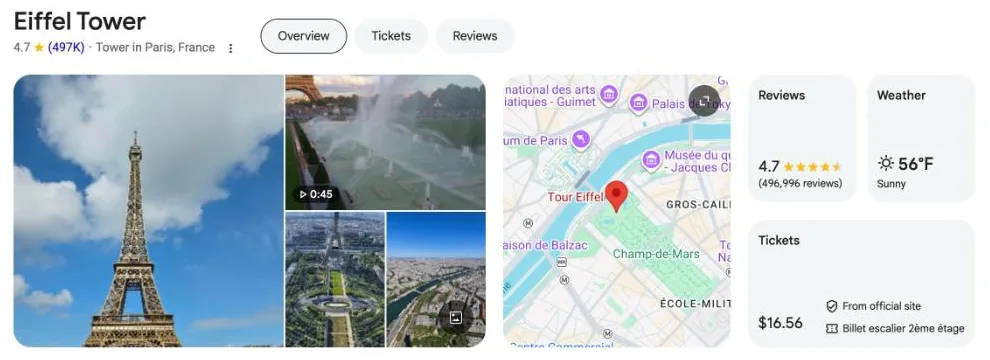
Example
A search for a well-known company name often shows a box with the logo, a short description, key facts and links to official profiles. Which details appear depends on the data Google holds for that entity.
Common mistakes
- Trying to edit the description in the panel. Descriptions come from various data sources and cannot be edited. Google advises contacting the source.
- Several changes in one suggestion. With multiple suggestions, feedback should be submitted for each item separately.
- Suggestions without public evidence. Google expects a description of what is wrong and publicly accessible URLs that support the suggestion.
Frequently asked questions
Can I create a knowledge panel for my brand? Google does not manually create knowledge panels. If one exists for your entity, you can claim it and suggest edits.
Is a knowledge panel the same as a Business Profile? They look similar. Business Profiles are for businesses that serve customers at a location or in a service area and are managed separately.
Sources
- About knowledge panels – Knowledge Panel Help (Google)support.google.com
- Submit feedback on content about you – Knowledge Panel Help (Google)support.google.com
- Get verified on Google – Knowledge Panel Help (Google)support.google.com
- Organization structured data – Google Search Centraldevelopers.google.com
Last updated: