Sitelinks are links from the same domain that Google groups under a text result. They give searchers a shortcut to a specific part of a site. This entry covers organic sitelinks in Google Search. Sitelink assets in Google Ads are a separate, paid feature where advertisers choose the link text and URLs.
How does Google choose sitelinks?
Google’s systems analyze the link structure of a site to find shortcuts that save users time. Google shows sitelinks only when it expects them to be useful for the query. If the site structure does not give its algorithms good candidates, or the links do not seem relevant to the query, none appear. Google describes the process as automated and says it may consider site owner input in the future. The documentation offers no markup or setting to request them.
Google lists these practices to improve their quality:
- Use informative, relevant and compact page titles and headings.
- Build a logical site structure that is easy to navigate, and link to important pages from other relevant pages.
- Keep the anchor text of internal links concise and relevant to the target page.
- Avoid repetition in the content.
How do you remove a sitelink?
Google suggests removing the page from the site or using noindex on it. A setting for individual sitelinks does not exist.
Related feature that no longer exists
The sitelinks search box, a search field shown with some brand results, is gone. Google removed its documentation on November 29, 2024 and stated the feature is no longer available in search results.
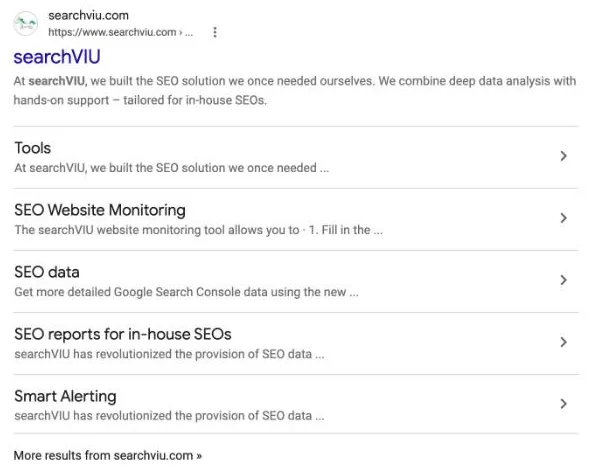
Example
For a brand name search, the first result may show links such as “Pricing”, “Careers” or “Contact” below the home page. Which links appear depends on the site’s structure and how Google rates their usefulness (constructed example).
Common mistakes
- Trying to force sitelinks with markup or a setting. According to Google they are automated at the moment, and individual sitelinks cannot be controlled.
- Vague or repeated titles and headings. Google names informative, relevant and compact titles and avoiding repetition as the basis for good sitelinks.
- Barely linking important pages. If the structure offers no good candidates, Google says it shows no sitelinks.
- Links Google cannot follow. Google crawls only
<a>elements with anhrefattribute.
Frequently asked questions
What is a sitelink used for? It lets searchers jump straight to a relevant page of a site from the results page.
How do I get sitelinks? Google decides automatically. A clear structure, descriptive titles and consistent internal links give its systems what they need.
Sources
- Sitelinks – Google Search Centraldevelopers.google.com
- Latest documentation updates (Removing sitelinks search box documentation, 29.11.2024) – Google Search Centraldevelopers.google.com
- What Are Sitelinks, Their Benefits, & How To Influence Them – Ahrefs (secondary)ahrefs.com
- Sitelink – Wikipedia (secondary)en.wikipedia.org
- Make your links crawlable – Google Search Centraldevelopers.google.com
Last updated: